Sheru Bhai AI Photo Prompts
Try two Sheru Bhai AI photo prompt presets: Photo with Sheru or Turn me into Sheru. Choose a look, upload your photo and create with Nano Banana 2.
Choose a preset
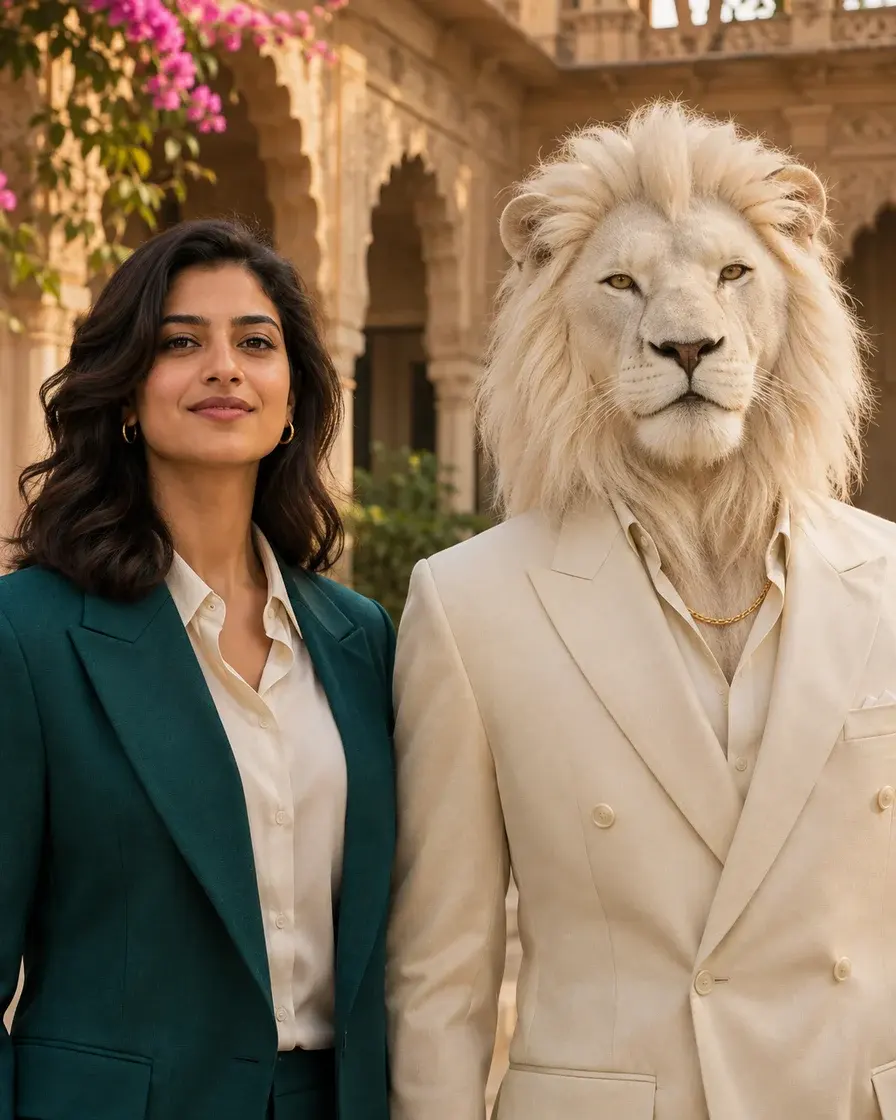
Add a clear solo portrait. You stay human; the lion stands beside you.
Choose your look
Stay yourself beside Sheru, or turn your own head into a lion's.
Add your photo
Upload a clear photo of one person that you have permission to edit. Your selected preset supplies the generation instructions.
Create your portrait
Click Generate. If you need access, choose an image pack or a subscription, then return to your prepared photo.
Looking for a Sheru Bhai AI photo prompt? Choose one of two portrait presets and upload your own photo. Photo with Sheru places you beside the white-lion boss; Turn me into Sheru gives you a lion head while aiming to keep your outfit and pose. Both presets start with Nano Banana 2 and a ready-to-use prompt. You can edit the prompt or choose another image model.
What is a Sheru Bhai AI photo?
Sheru Bhai is a fictional lion-headed character seen in social-media images and short stories. A white mane, tailored suit and gold chain are recognizable parts of the look. In a photo edit, you can appear beside the character or take on the lion-head look yourself.
The photo trend was covered by Hindustan on November 12, 2026. The two presets here focus on still portraits made from your own reference photo.
Choose your Sheru Bhai AI photo preset
Photo with Sheru keeps you as a separate human subject beside a white lion in an ivory suit. Use a clear front-facing solo portrait with your face unobstructed.
Turn me into Sheru changes your head into a lion's while aiming to retain your outfit and stance. A knee-up or full-body standing photo shows more of the clothing you want to keep. This mode intentionally replaces your human face.
How to create your Sheru Bhai AI photo
- Select Photo with Sheru or Turn me into Sheru from the presets above.
- Upload a clear photo of one person that you have permission to edit.
- Review the price and click Generate to create your portrait.
The editor starts with Nano Banana 2 at 1K for both looks; you can change the model and output settings. Generate with subscription credits, a purchased credit pack, or an eligible Image Pass. Selecting a preset and uploading your photo does not start a generation or spend credits.
Review and share your Sheru portrait
Check the human face, the join between the lion head and collar, and any visible hands. Facial details, outfits and proportions can change. A clear, unobstructed reference photo helps the model understand the subject. Mark the result as AI-generated when sharing it.
The two images on this page are separately created AI style illustrations. They are not product test results or a promise of identical output. For another portrait idea, try an 1980s AI photo.
Sheru Bhai AI photo prompt FAQ
Do I need to write a Sheru Bhai AI photo editing prompt?
No. Select a preset and upload your photo. The selected look supplies the generation instructions automatically.
How do I make a photo with Sheru Bhai?
Choose Photo with Sheru and upload a clear solo portrait. This look keeps you human and adds a separate white-lion character beside you.
How do I turn myself into Sheru?
Choose Turn me into Sheru and upload a standing photo with your outfit visible. This look replaces your human head with a white lion head while aiming to keep your clothes and pose.
Which model creates these Sheru Bhai photos?
Both Sheru presets start with Nano Banana 2 at 1K. Use the model selector to choose another image model and adjust its available output settings. Your photo and edited prompt stay in place.
Is the Sheru Bhai AI photo editor free?
You can select a preset and upload your photo before buying. Generation requires subscription credits, a purchased credit pack, or an eligible Image Pass. Check the price shown in the editor before generating; free sign-in credits alone do not unlock these presets.
Questions about this photo idea
How do I make a photo with Sheru Bhai?
Choose Photo with Sheru, upload a clear solo portrait and click Generate. This preset keeps you human and adds a separate white-lion character beside you.
Can I turn myself into the lion?
Yes. Choose Turn me into Sheru and upload a standing photo with your clothes visible. This mode replaces your head with a lion head; it does not preserve your human face.
Is this template free?
You can select a preset and upload your photo before buying. Generation requires subscription credits, a purchased credit pack, or an eligible Image Pass. When needed, Generate offers the $2.99 pack for three successful images, with no subscription, or other plans. Free sign-in credits alone do not unlock this template.
Do I need to write a Sheru Bhai AI photo editing prompt?
No. Select Photo with Sheru or Turn me into Sheru and upload your photo. The preset supplies the generation instructions automatically; you do not need to write a prompt.
Are these pictures actual EzImageAI results?
They are AI-created style illustrations made separately for this page, not outputs from this template in the EzImageAI editor. They show the direction of each look rather than a guaranteed result.
Is this an official Sheru Bhai app?
EzImageAI is an independent image editor. These are fictional, AI-generated portraits inspired by the trend. We are not affiliated with a trend creator or social platform.