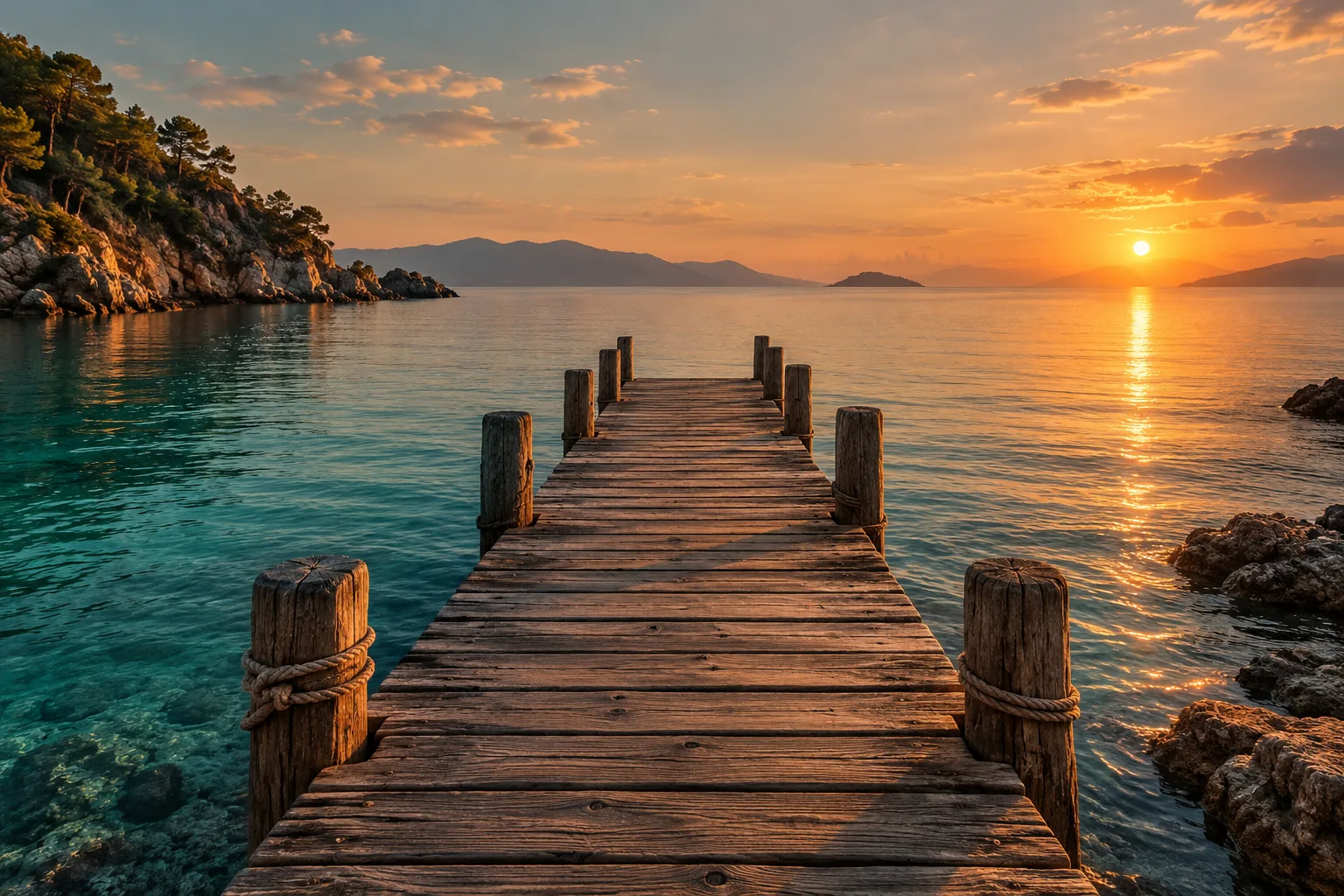
The Raindance AI trend turns a photo into a seaside music-video moment: a wooden pier, warm sunset light and a relaxed performance toward the camera. People pair the edit with “Raindance” by Dave featuring Tems. The AI-generated visual and the song are separate parts of the finished post.
To make your version here, choose Solo for one adult photo or Duet for two, sign in to see the complete price, upload and choose Generate. A fresh quote is checked before starting; any price change requires your confirmation. EzImageAI creates an original 5- or 10-second, 720p, 9:16 silent MP4 (5 seconds by default). Add an available, appropriately licensed sound when posting. The prompts below are free to copy; generating a video uses eligible paid credits.
What is the Raindance AI trend?
The recognizable setup is a person performing on a wooden pier by the sea in low, warm light. A solo edit focuses on one person; a duet shares the scene between two people. Some edits open on the source photograph before cutting to the seaside shot.
The song and official music video are by Dave and Tems. EzImageAI is independent and is not affiliated with the artists, their labels or any other Raindance tool. This template creates a new scene around your photos. It does not replace faces in the original music video, include the recording or recreate a full song performance.
Four ways to make a Raindance AI video
Choose the workflow that matches the material you already have. This is a comparison of approaches, not a measured quality or speed ranking.
| Method | What you supply | What you control | Before you start |
|---|---|---|---|
| CapCut template | Your own photos or clips | Timing and layout offered by the chosen template | Check the actual template, export rules and any paid elements |
| Two-photo AI duet | One clear photo per adult | Who occupies each role | Check both people's permission and the complete generation cost |
| Video face replacement | Authorized reference footage and a face photo | The subject inserted into existing motion | Requires a separate tool; rights to footage and likeness still matter |
| One-photo AI scene | One clear adult photo | The scene and performance direction | EzImageAI Solo makes an original short pier scene; it does not copy the original video |
Our Hotel Lobby duo uses the same upload-and-quote approach for an orange-studio performance. Raindance uses a sunset pier instead.
How to make the Raindance AI video from one photo
- Select Solo above. Use a sharp, mostly front-facing adult portrait. A waist-up photo gives the model more information about clothing and posture than a tightly cropped face.
- Sign in and upload your photo. JPEG, PNG and WebP are supported, with a ceiling of 10,000,000 bytes per photo. Account limits can be lower. Uploading does not start a paid generation.
- Review total credits. The quote covers scene preparation and the final video together. Confirm only after checking the amount. The intermediate scene is not a second retail order.
- Check the result in your private history. Accepted work continues in the background. Returning to the same order checks its progress without starting it again.
- Download and edit your post. If you want a photo-to-pier reveal, place your original photograph before the clip in your editor and use a hard cut. The built-in template starts on the pier; it does not promise that opening transition.
The preset uses a fixed camera and restrained movement to keep the short scene readable. It does not promise exact lip synchronization, perfect facial similarity or the original choreography. Review the faces and movement before sharing.
Can you do the Raindance AI trend for free?
You can read this guide and copy every prompt below for free. EzImageAI video generation is paid, requires sign-in and uses eligible credits. The guest image allowance does not include video. The amount shown in your current quote is the amount to review before confirming.
For an edit without AI generation, the linked CapCut collection advertises free templates. Check the individual template and your app's export screen: paid assets, account rules and regional availability can differ. We have not verified a free AI video offer on another service and do not promise one.
Free Raindance AI prompts to copy
These are original, editable prompt suggestions for an image-to-video workflow. They are not claims of tested results or guaranteed settings in another tool. The generator above uses its own fixed preset; copying or editing these suggestions does not change an accepted order.
Solo sunset pier
Prompt
Use the uploaded adult portrait as the identity reference. Place one person on a weathered wooden jetty above calm teal water at sunset. Retain the reference face, hairstyle and clothing. Frame the person from the waist up, with warm side light and a clear sea horizon. Over a short shot, use a subtle shoulder sway and one small glance toward the camera. Keep the camera still, the face unobstructed and the background stable. Exactly one person. No captions, logos, scene cuts or audio.
Why these details help: “identity reference” tells the tool which photo defines the person. The waist-up framing leaves useful facial detail. A still camera and a single small action reduce competing motion requests. “Exactly one person” distinguishes the solo composition from a duet.
Duet on the pier
Prompt
Reference photo 1 defines the adult on the left. Reference photo 2 defines the adult on the right. Create one continuous seaside pier scene in warm evening light. Keep the two faces, hairstyles and outfits distinct, with a little space between the performers. The left person makes a small rhythmic gesture while the right reacts, followed by a brief shared glance. Keep both faces visible and keep the camera fixed. No extra people, identity swaps, split screens, captions or audio.
Why these details help: explicit left and right roles reduce ambiguity. Space between the subjects gives hands and faces room. The brief exchange is a simpler request than two simultaneous full-body dance routines.
Rain-on-the-pier variation
Prompt
Use one adult portrait as the identity reference. Create a quiet portrait on a wooden pier at blue hour with fine rain visible in warm lamplight. Keep the face clearly lit, the reference hairstyle recognizable and the sea horizon steady. Use a slight natural sway and a calm look toward the lens. Fixed camera, one person, no scene cuts, captions or audio.
This is a prompt idea for a tool with editable scene instructions. The EzImageAI preset above currently offers the sunset-pier scene, not a rain toggle.
Add the before-and-after cut
In a general image-to-video tool you can try an instruction such as “Begin on the supplied photograph, then cut directly to the new pier scene.” A model may blend the frames instead. For predictable timing, assemble your own photo and completed clip in a video editor and choose a hard cut there.
Best photos and common problems
| Problem | What to try |
|---|---|
| The face looks different | Use a sharper portrait with even lighting, no sunglasses and fewer filters; similarity still varies |
| The wrong person takes a role | Check the left/right previews and swap the uploads before requesting a fresh quote |
| Hands cover the face | Prefer a simple source pose and small gestures; review the output before posting |
| The result barely moves | A short, restrained performance can be subtle; do not expect a full dance routine |
| The transition blends instead of cutting | Add your own source photo before the finished clip in an editor |
| A saved photo has expired | Upload it again and review the new quote |
| An order needs review | Check the same order in history; an uncertain paid request should not be replaced automatically |
These are preparation suggestions, not measured success rates. Pets, cartoons, children and group-photo splitting are not supported promises of this adult-portrait template. For a duet, upload each consenting adult separately.
How to add the Raindance song on TikTok
- Download your completed silent MP4.
- Create a TikTok post and select the clip from your device.
- Open the sound picker and search for “Raindance Dave Tems.” Choose an available version permitted for your account and the type of post. If it is unavailable, choose another licensed sound.
- Trim the sound and adjust the clip timing in the editor. A five-second scene is a short excerpt, not a complete song performance.
- Review the post, add the AI-generated label for realistic AI visuals and publish when ready.
TikTok's available sounds and menus can vary by region and account. A sound available for a personal post does not automatically give you a commercial license. For Reels or Shorts, use that platform's own permitted music tools.
Make the duet version
Switch to Duet in the generator, upload one adult photo per role and check the left/right previews. You can swap the positions before reviewing the quote. Both subjects are placed into one new pier scene; you do not need to upload the original music video.
Solo and Duet keep separate drafts. Switching modes never starts a generation, and an unresolved confirmation can be recovered in its original mode. Your private history links back to accepted orders. Another generation requires another quote and confirmation.
Raindance AI or rain dance AI?
Raindance AI trend usually points to the song-associated seaside edit described here. Rain dance AI can also mean a generic dancer in heavy rain, often on a night-time street. The spacing alone does not establish which effect someone wants.
For the pier look, specify a wooden jetty, sea horizon and golden-hour lighting. For a rain scene, explicitly describe the rain, location and lighting. This page's generator uses the sunset pier; a street-in-the-rain choreography is a different scene.
Frequently asked questions
Do I need one photo or two?
Solo needs one clear adult photo. Duet needs two role photos. Only use photos you have permission to edit. You can use the same adult for both duet positions, but two separate faces are not guaranteed to look identical.
Is the Raindance prompt free?
Yes. The text suggestions are free to copy. Video generation uses paid eligible credits and the current quote; copying a prompt or uploading a photo does not itself charge for a video.
Does the video include music or exact lip-sync?
No. The built-in output is a silent MP4. Add permitted music in your posting app. Exact lyric synchronization, voice imitation and the original recording are not included.
Are my photos and videos public?
No. Your uploads, prepared scene and result stay private account assets. The pier illustration on this page is an AI-created location concept, not your result or a verified video sample. Availability follows your account's retention rules.
Can I leave while it generates?
Yes, after the order is accepted. Return to its existing history entry to check progress and download when ready. Refreshing or downloading again does not create a second generation.
What if it fails?
A confirmed failure follows the existing credit and settlement rules. An uncertain provider outcome may hold the reservation for review. Check the order's credit state; a visual result you dislike is not the same as a request that never ran.
Related tools and guides
- Hotel Lobby AI duo: an orange-studio performance from two photos.
- AI image editing prompts: clearer instructions for preparing your source image.
- Image-to-image editor: adjust a portrait before making a video.
- Credits and billing: understand balances, reservations and eligible credits.
- Private editing workflow: understand private inputs and results.