On this page
An 80s photo can mean a carefully lit studio portrait, a slightly faded print from a family album, or a casual snapshot outdoors. The clothes, lighting, setting, and print texture do more to distinguish these looks than adding a generic vintage filter.
The three ideas below start with the same AI-generated fictional adult. Each pairs the original with an actual EzImageAI output and the exact prompt used for that result. Pick the direction that suits your photo; copying a prompt or choosing a style does not start a generation.
Choose a direction for your portrait
Start with the setting you want: a composed studio portrait, a warm living-room snapshot, or a casual street scene. Each comparison shows both what worked in that run and what changed from the reference. The full prompts are available under each example.
These are authorized test images. Your own uploads and generated results remain private.
Soft-focus studio portrait
Choose a clear, well-lit portrait of one person with room above the head. The studio recipe changes hair, clothing, and backdrop; it is not an identity-locking tool.
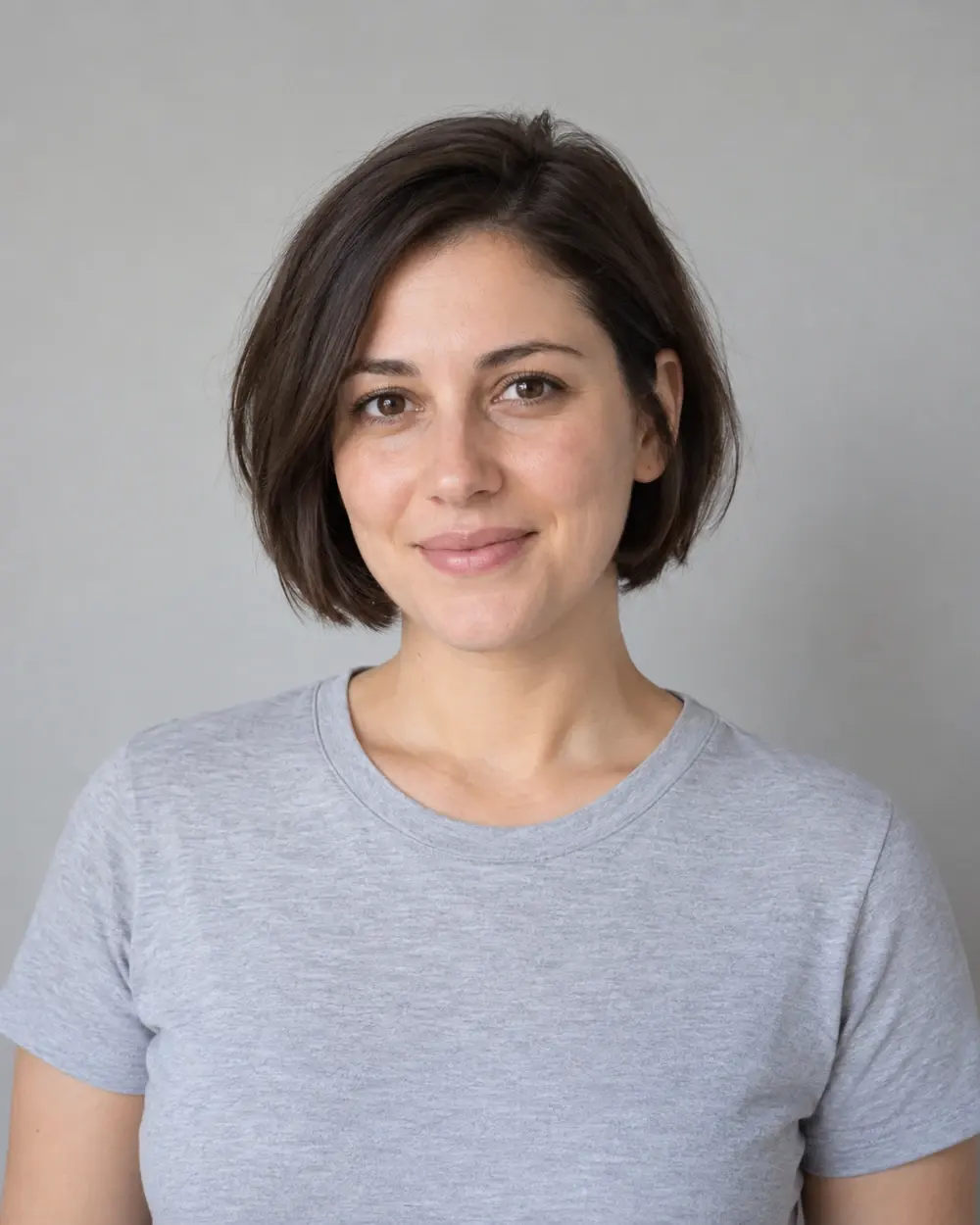 Original
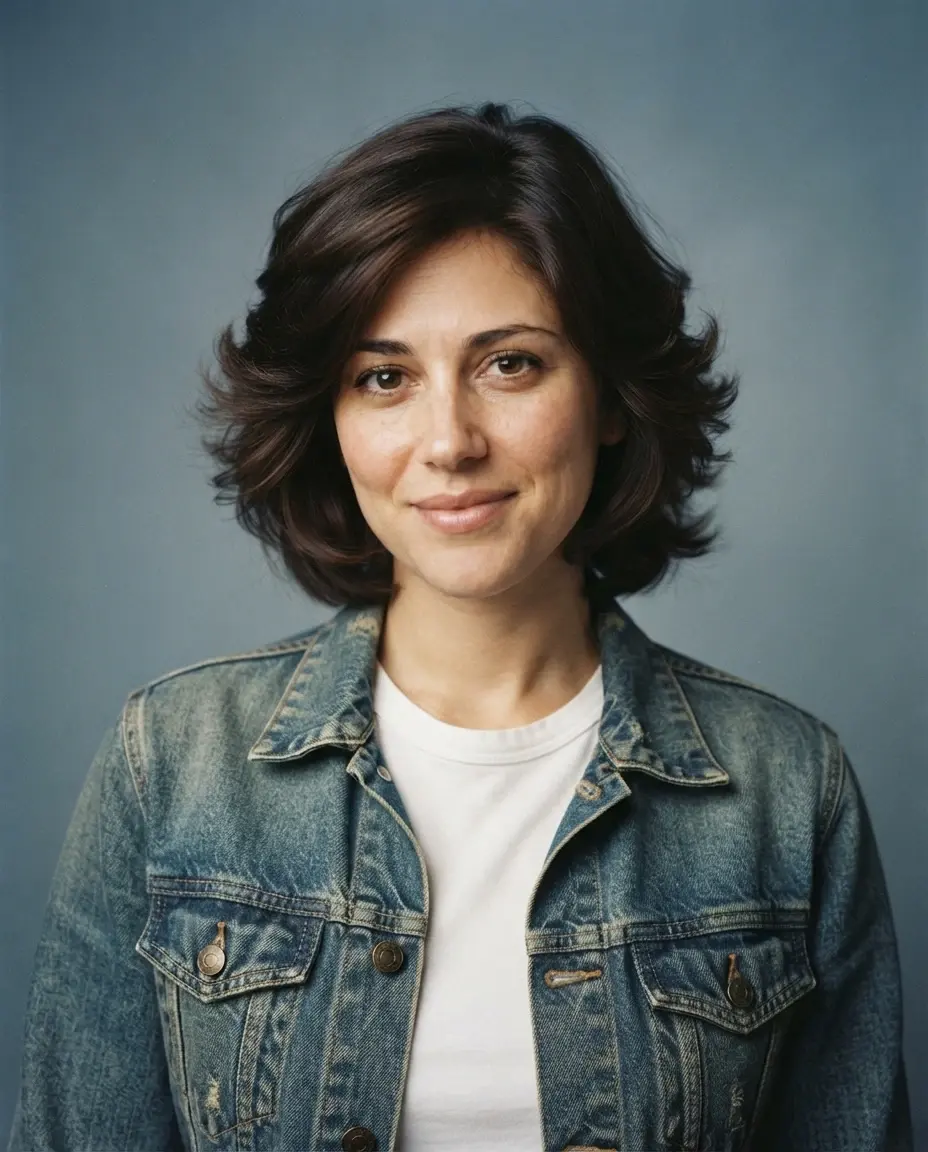 Generated
A denim jacket, feathered hair and blue-gray backdrop create the studio look. Facial details and the crop changed slightly from the original.
Nano Banana 2 Lite · 1K · 4:5
Full prompt
Transform the uploaded portrait into a photorealistic 1980s studio photograph. Use the reference image as the guide for the person's facial structure, skin tone, apparent age, and expression; do not deliberately change their identity. Add a softly feathered hairstyle and a period-inspired denim jacket over a plain shirt. Use a muted blue-gray studio backdrop, soft portrait lighting, gentle diffusion, subtle 35mm film grain, and restrained faded color. Keep natural skin texture and realistic anatomy. Avoid neon cyberpunk styling, cartoon rendering, text, watermarks, and deliberate beauty reshaping.
Family-album snapshot
Use a clear single-person portrait. This recipe creates a living-room snapshot; the model may invent borders or background decorations. Group-photo preservation has not been tested.
Original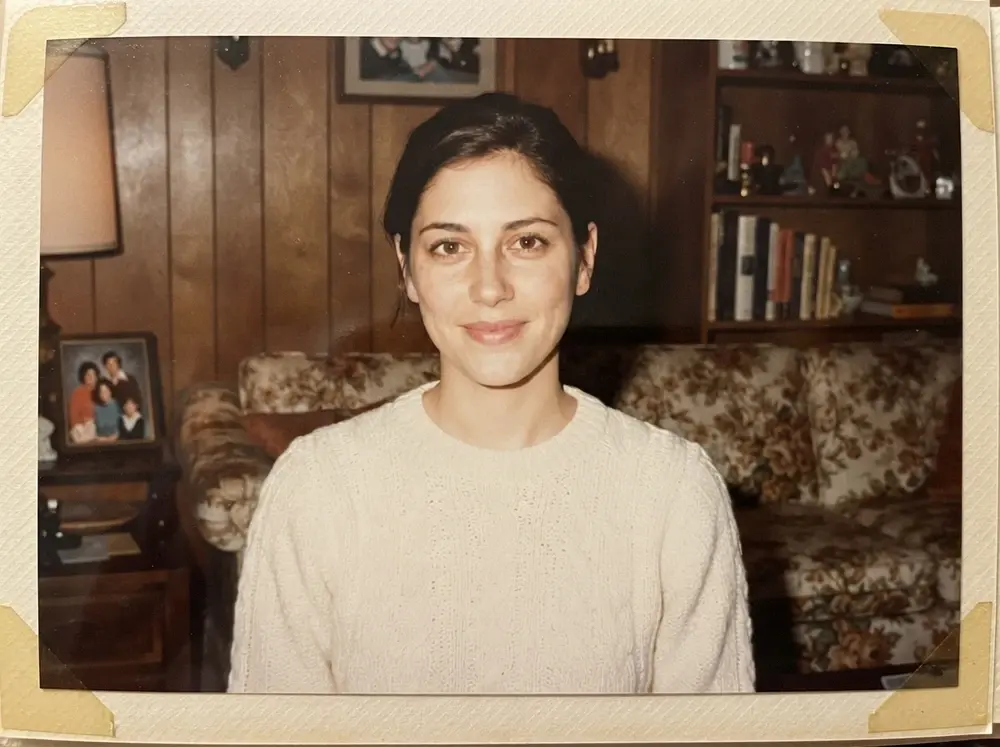 Generated
The revised family-album prompt produced natural brown eyes and a closed-mouth smile in this run. The model also added the album border and background decorations.
Nano Banana 2 Lite · 1K · 4:3
Full prompt
Restyle the uploaded portrait as a family-album photograph inspired by the 1980s. Follow the reference image for the person's facial structure, skin tone, and apparent age, and keep the same relaxed closed-mouth expression. Show the same person in a simple period-inspired knit sweater in a modest living-room setting, without adding other people. Use gentle off-axis bounced-flash lighting, warm indoor tones, mild print fading, and fine consumer-film grain. Keep the eyes naturally brown without red-eye, and keep the face and eyes free of scratches, dust, or damage overlays. Keep the scene believable and the person recognizable as a goal, not a guaranteed result. Avoid heavy beauty retouching, captions, watermarks, and cartoon effects.
Late-afternoon street portrait
Start with one person and a clearly visible face and torso. Check newly generated clothing edges, hands, and background details before sharing.
Original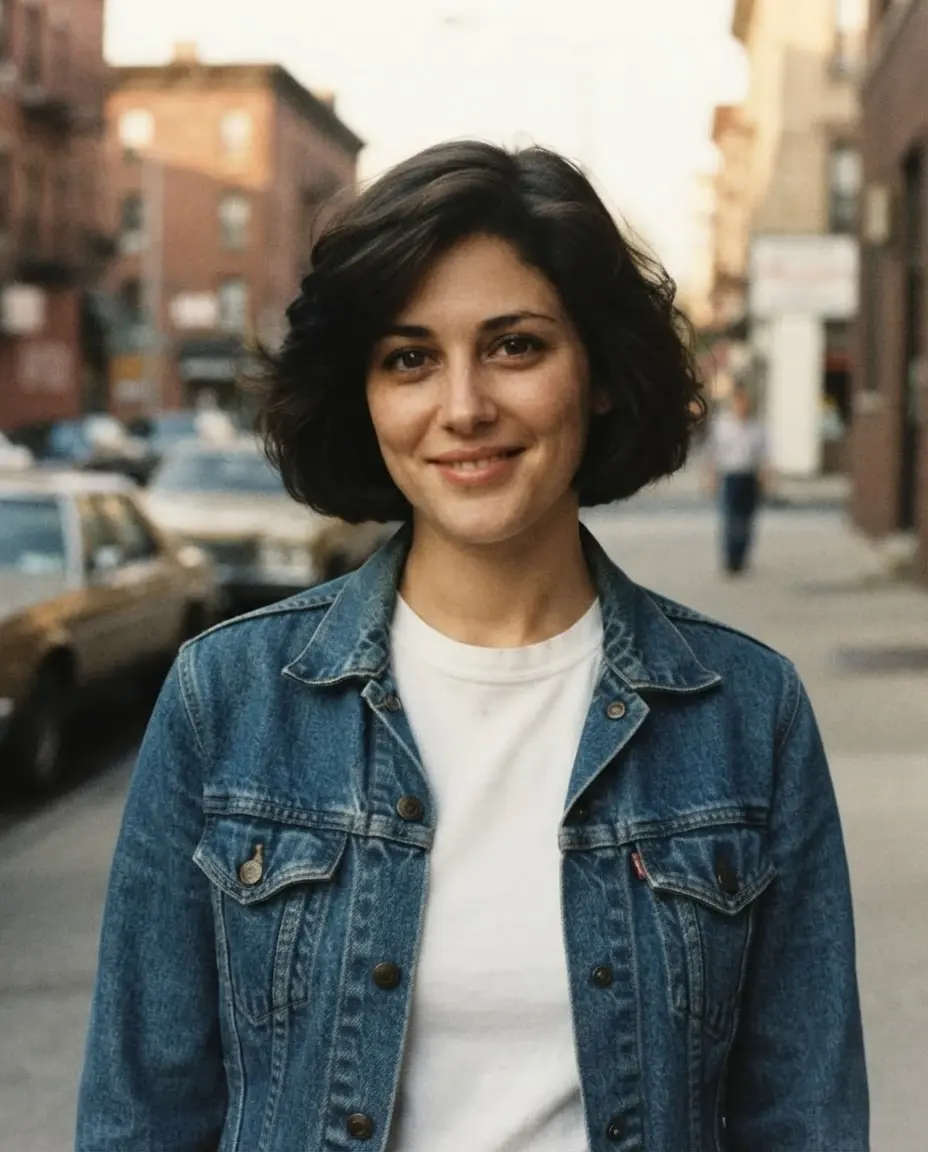 Generated
Warm street light and a denim jacket create the outdoor look. The smile changed, and the cars and blurred pedestrian were generated.
Nano Banana 2 Lite · 1K · 4:5
Full prompt
Create a photorealistic 1980s-inspired street portrait from the uploaded reference photo. Use the person's facial structure, skin tone, apparent age, and expression as the identity guide. Style the person with a denim jacket, a plain T-shirt, and restrained period-inspired hair. Place them on an ordinary city street in soft late-afternoon light, with an unobtrusive background and no readable signs. Use muted warm colors, natural shadows, mild film grain, and realistic skin texture. Avoid neon sci-fi scenery, exaggerated fashion, deliberate facial reshaping, extra fingers, text, and watermarks.
Prepare your own photo
Choose a clear, well-lit portrait you have permission to edit. One visible face and shoulders, with some space above the head, are closest to the reference used here. Children, groups, hands, obscured faces, and full-body photographs were not tested.
After selecting a style, upload your own photo and review the prompt and current settings. The editor shows model availability, account or guest eligibility, and the current credit quote. Generate only when those settings are right for you.
Try this photo idea
Choose a preset, upload your photo, and review the current model and credit cost before generating.
OriginalGeneratedA denim jacket, feathered hair and blue-gray backdrop create the studio look. Facial details and the crop changed slightly from the original.
Nano Banana 2 Lite · 1K · 4:5
Choose a clear, well-lit portrait of one person with room above the head. The studio recipe changes hair, clothing, and backdrop; it is not an identity-locking tool.
Current prompt
OriginalGeneratedA denim jacket, feathered hair and blue-gray backdrop create the studio look. Facial details and the crop changed slightly from the original.
Nano Banana 2 Lite · 1K · 4:5
Adjust the look and review the result
To experiment, change one styling detail at a time, such as the jacket, background, or strength of the film grain. These are suggestions to try, not tested guarantees. Return to the original image if successive edits move too far from the person or composition you want to keep.
Compare facial features, expression, apparent age, hair, and the crop with the original. The prompt asks the model to use the reference as a guide, but it cannot guarantee an identical face. These images are AI interpretations of a decade, not historical records.
What the examples establish
Four product generations were reviewed on September 29, 2026, using Nano Banana 2 Lite at 1K. Three selected outputs are shown above with their matching prompt versions and aspect ratios. Their common original was created separately with an image model. The website images were resized or compressed without creative retouching.
The first family-album output had red-eye and an open smile. A revised prompt asked for off-axis bounced flash, natural brown eyes, and the same closed-mouth expression. The selected second output showed no obvious red-eye and a closed mouth. Several instructions changed together, so one comparison cannot tell us which change caused the improvement.
This is a small demonstration using one fictional adult, not a success-rate study or a test of identity preservation across different people. The article was reorganized on October 4, 2026; no new generations were performed for that update.
For general wording advice, see how to write image editing prompts. The private editing workflow explains how your own uploaded photos and results are handled.
What to check in your result
- Facial details, expression, hairstyle, and framing can change. These examples show one fictional adult reference and do not establish a success rate or reliable identity preservation.
- A request to preserve identity does not guarantee unchanged facial features. Compare every face with the original before sharing a result.
- Crowded scenes, obscured faces, small subjects, text, and complex clothing can produce missing or altered details.
- These are AI interpretations of 1980s photography, not historical photographs. Clothing and other period details may be inaccurate, and repeated runs can change the composition, face, and colors.
- The family-album result added a paper border and background decorations; the street result changed the smile and added background scenery. Hands, groups, and full-body photographs were not tested.
- Model availability, account eligibility, usage limits, and the current credit quote are determined by the editor. Normal content and legal requirements apply.
Questions about this photo idea
What kind of original photo should I upload?
Start with a clear, well-lit photo of one adult, with the face and shoulders visible and space above the head. The three examples use the same AI-generated fictional adult. They do not show results for children, groups, obscured faces, or full-body photos.
Which 1980s photo style should I choose?
Choose Studio for a denim jacket, feathered hair and a muted backdrop; Family-album for a knit sweater and warm living room; or Street for denim and late-afternoon city light. Each preview shows one actual result, including details the model added on its own.
Can I copy a prompt without uploading a photo?
Yes. A published prompt can be read and copied without starting a generation. These photo-editing presets are designed to use a source image when you generate.
Will the edit keep every face identical?
No. A reference photo guides the result, but facial proportions, expression, and apparent age may still change. Compare each output with your original. These single-person recipes do not establish results for group photos.
Does choosing a preset spend credits?
Choosing a preset prepares the editor. Review the live settings and quote before explicitly submitting a generation; existing eligibility and billing rules still apply.
Are these preview images really generated in EzImageAI?
Yes. The three displayed outputs were generated through EzImageAI with Nano Banana 2 Lite at 1K on September 29, 2026, using the exact prompt versions and aspect ratios shown here. The original is an AI-generated fictional adult created separately as the common reference. Four product runs were reviewed; an earlier family-album result with red-eye was excluded. The images were resized or compressed for the web, without creative retouching.
What helped with unwanted face changes in this test?
The first family-album run added red-eye and an open smile. A second run used a revised prompt asking for gentle off-axis bounced flash, natural brown eyes and the same closed-mouth expression; that output had no obvious red-eye and kept a closed mouth. Several instructions changed together, so this single comparison does not prove which instruction caused the improvement or guarantee the same outcome on another photo.
Do I need an account, and what does generation cost?
Reading and copying these prompts does not require an upload or payment. Generation uses the editor's current guest eligibility or account access rules. Check its live credit quote, model availability and limits before starting. Your own inputs and results remain in the existing private media workflow; they are not added to this public example library.